In this article, you'll learn how to give each of your ads its own phone number so you can see which ones actually make your phone ring. If you're paying for Google Ads, a mailer, yard signs and a truck wrap, this tells you where the money is working and where it isn't.
How call tracking works
You buy an extra phone number for each place you advertise and put that number only there. Then:
- Calls to the number ring through to you, the same as a call to your main line.
- Texts sent to the number land in Conversations like any other message.
- Each number feeds a source. A caller or texter who's saved as a contact is credited to that number's source for life, so their payments keep counting toward it.
- The ROAS report adds it all up per source: leads, jobs booked, revenue and what you spent.
A first-time caller isn't turned into a contact on their own. The call and the thread stay under their number, and when you save them as a contact, a lead or a job, they're credited to the number they first called.
Each tracking number costs $5 a month, added to your subscription. Call tracking is part of the CRM, so there's nothing to switch on first.
To open call tracking:
- In the menu, click Call tracking.
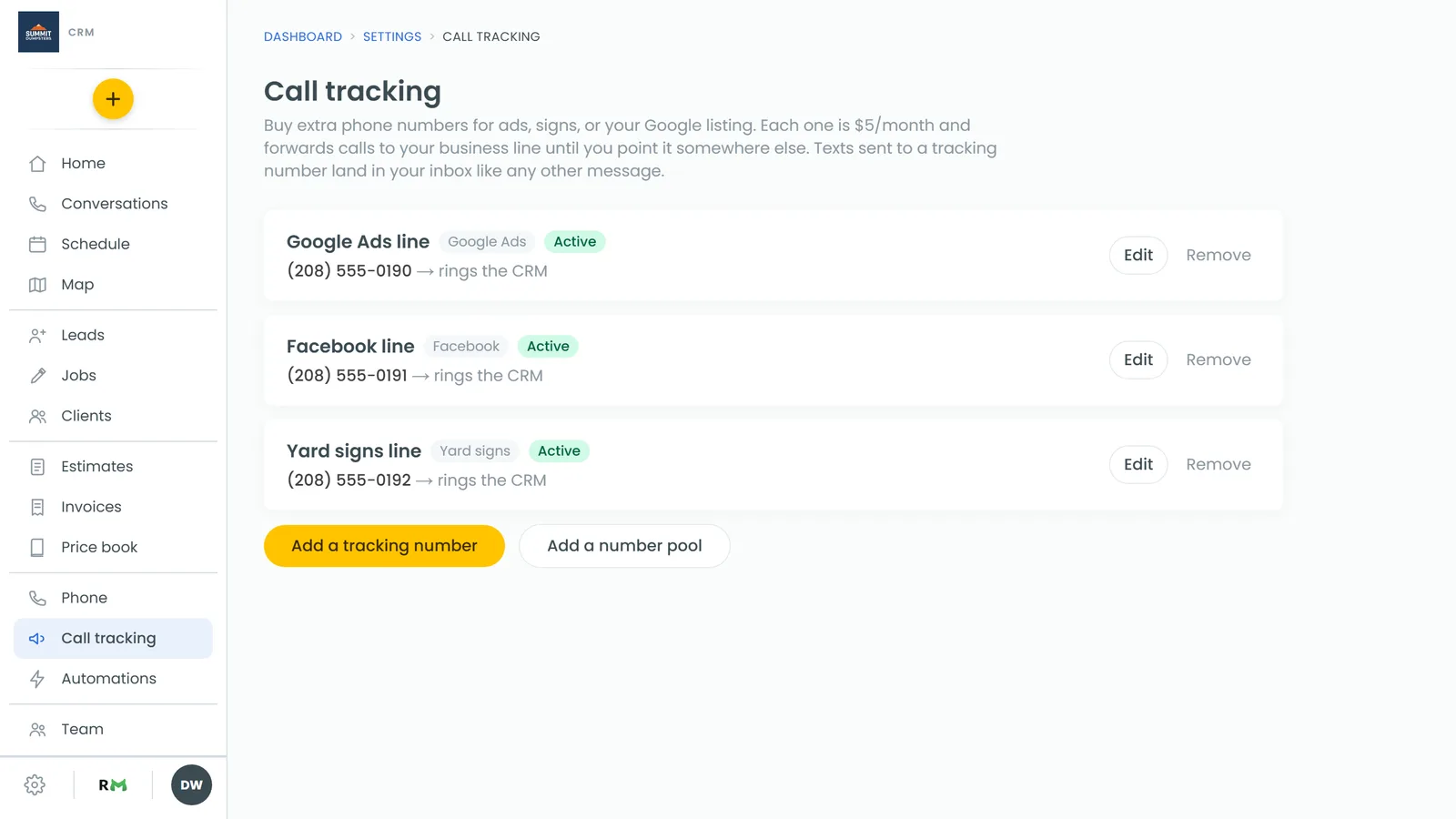
Add a tracking number
- Click Add a tracking number.
- Type a City and an Area code, then click Search numbers. Each result shows the town it belongs to.
- Under Pick a number, click the one you want. If nothing comes up, try a nearby town or area code.
- In Name this number, give it a name you'll recognize, like "Google Ads".
- In Where will you use it? (optional), note where it'll go, like "Spring mailer" or "truck decal".
- Under Ad source, leave New ad source named after this number to start a fresh source, or pick one of your existing sources.
- Click Get this number.
The number works as soon as setup finishes. Until you change it, calls forward to your business line.
Change where a number rings
- Next to the number, click Edit.
- Change the Name, Used on (optional) or Ad source if you need to. Changing the source only affects new callers. Anyone already credited stays where they are.
- Under Calls ring, pick one:
- Forward to a number: calls go to the phone in Forward calls to. Set Ring for (seconds), tick Record calls (callers hear a short recording notice) if you want recordings, and add a Whisper message (optional). Whoever answers hears the whisper, like "Call from your Google Ads number". The caller never hears it.
- The CRM (ring targets, like your main line): the number rings the same people your main line does, and business hours, voicemail and recording follow your main line's settings.
- Click Save. Call settings can take a few minutes to apply.
Missed-call alerts
A missed call or voicemail on a tracking number is announced the same way as one on your main line. If the number forwards, that phone always hears about it. The Missed call and Voicemail rows in Notifications decide who else does.
Remove a number
- Next to the number, click Remove.
- Confirm. Calls to that number stop working and the $5 monthly charge ends.
Number pools for your website
If we build and host your website, you can give it a pool of numbers instead of one. Each visitor sees their own number from the pool, so when they call you know what brought them in, like a Facebook post or a Google ad, not just "Website". Search engines keep seeing your real number.
You'll only see Add a number pool if you have a site we host that doesn't have a pool yet.
- Click Add a number pool.
- Pick the Website.
- Set Numbers in the pool with the − and + buttons. It starts at 4, which is the smallest pool allowed.
- Under Calls ring, choose Forward to your business line or The CRM (ring targets, like your main line).
- Click Set up the pool.
Each number in the pool is $5 a month. The pool's card shows your visits over the last two weeks and your busiest hour. Use + to add a number if it ever runs short.
Read the results
Once your numbers have been out for a while, open Reports and choose ROAS. Each source shows its leads, jobs booked, revenue and spend for the dates you pick. New numbers need some time before the figures mean much.
Related articles
- Tracking where your customers come from
- How to get a new phone number
- Choosing who your calls ring
- Turning on call recording
- How texting works when you have more than one number